
Logitech MX Master 3S Review: Best Mouse for Creators 2025
👉 Take action now. Upgrade your workspace. Manage your future! BUY NOW
Logitech MX Master 3S Review 2025: The Ultimate Mouse for Creators and Professionals.
Introduction: Why the Right Mouse Matters
When it comes to maximizing productivity, having the right tools can make all the difference. For creators, designers, developers, and even business professionals, a mouse is not just a peripheral — it’s an extension of your hand. Enter the Logitech MX Master 3S — a premium productivity mouse designed for those who demand precision, comfort, and efficiency.
In this comprehensive Logitech MX Master 3S review, we dive deep into why this mouse stands out in 2025 as the best mouse for creators, and how it redefines workspaces across industries.
1. Overview: Meet the Logitech MX Master 3S
Released as the successor to the much-loved MX Master 3, the Logitech MX Master 3S fine-tunes everything that made the original great. It introduces silent clicks, 8,000 DPI tracking, and compatibility with multiple operating systems.
Key Specs:
- Sensor: Darkfield High Precision, 8,000 DPI
- Buttons: 7 programmable buttons
- Scroll Wheels: Electromagnetic MagSpeed scroll
- Connectivity: Bluetooth + Logi Bolt USB receiver
- Battery Life: Up to 70 days on a full charge
- Compatibility: Windows, macOS, Linux, iPadOS, and Android
This mouse is designed for power users who want the best of the best without compromise.
2. Design and Ergonomics: A Sculpted Masterpiece
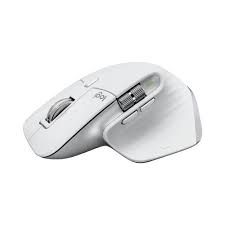
The first thing you notice when you pick up the MX Master 3S is its incredible ergonomic design. The mouse fits perfectly into the hand, with a sculpted shape that supports your palm and fingers naturally.
Why Ergonomics Matter
Prolonged use of poor-quality mice can lead to wrist strain and carpal tunnel syndrome. With its full-size body and contoured thumb rest, the MX Master 3S promotes a natural hand posture, reducing fatigue during long working hours.
Materials:
The soft-touch finish provides excellent grip without feeling sticky. The materials used are premium and durable, adding to the overall feeling of luxury.
Drawback:
If you have smaller hands, the MX Master 3S might feel a little bulky.
3. Performance: Silent Precision That Redefines Clicking
One of the most notable upgrades in the MX Master 3S is its Quiet Click technology. Logitech claims it’s 90% quieter than the previous generation — and it’s true. Clicking feels soft yet tactile, providing feedback without the noisy distractions.
The Power of 8,000 DPI
The 8,000 DPI Darkfield sensor tracks on virtually any surface — including glass. Whether you’re editing photos, designing 3D models, or coding, the precision is absolutely top-notch.
Customizable DPI Settings let you adjust sensitivity on the fly — perfect for switching between pixel-perfect design work and fast scrolling through long documents.
4. Features That Set It Apart
MagSpeed Electromagnetic Scroll Wheel
Forget traditional scroll wheels. The MX Master 3S uses a MagSpeed Electromagnetic scroll wheel, offering two scrolling modes:
- Ratchet Mode: Click-to-click precision.
- Free-Spin Mode: High-speed scrolling, up to 1,000 lines per second.
Switching between modes is seamless, giving you complete control whether you’re reading documents or flying through Excel sheets.
Multi-Device and Multi-OS Support
Thanks to Logitech Flow and Easy-Switch technology, you can:
- Control up to three devices simultaneously.
- Seamlessly copy-paste text, images, and files across Windows and MacOS computers.
For remote workers and multi-device professionals, this feature alone can justify buying the MX Master 3S.
5. Software and Customization: Your Workflow, Your Way
Using Logi Options+ (Logitech’s configuration software), you can map each of the seven buttons to:
- Specific app commands (Photoshop tools, Premiere timeline scrubbing, etc.)
- System shortcuts (copy, paste, undo)
- Custom gestures via the thumb button (like Exposé on Mac)
Imagine a mouse that changes functionality depending on whether you’re editing in Photoshop, writing in Word, or managing files in Finder — that’s the power of customization with the MX Master 3S.
6. Battery Life and Charging
The MX Master 3S boasts epic battery performance:
- One full charge lasts up to 70 days.
- Quick charging gives 3 hours of use from just 1 minute plugged in.
- Uses modern USB-C instead of outdated Micro-USB.
This means you spend more time working and less time worrying about cables.
7. Ideal Use Cases: Who Should Buy the MX Master 3S?
| Profession | Why It’s Perfect |
|---|---|
| Graphic Designers | Pixel-perfect precision and customizable buttons. |
| Video Editors | Seamless timeline navigation and ergonomic comfort. |
| Developers | Multi-device support, programmable buttons for coding tools. |
| Writers and Researchers | Fast scrolling and long-term comfort. |
| Business Professionals | Elegant design and flawless productivity tools. |
If you use your mouse for more than just browsing Facebook, this is the mouse to get.

8. Comparison with Other Mice
| Feature | MX Master 3S | Apple Magic Mouse | Logitech M720 Triathlon |
|---|---|---|---|
| Ergonomics | ★★★★★ | ★★★☆☆ | ★★★★☆ |
| Battery Life | ★★★★★ | ★★★★☆ | ★★★★☆ |
| DPI Range | Up to 8,000 | Fixed | Up to 1,000 |
| Silent Clicks | Yes | No | No |
| Price Range | $$ | $$ | $ |
The MX Master 3S outperforms competitors across the board, especially for professional workflows.
Pros and Cons
Pros:
- Silent clicks and tactile feedback.
- Tracks on any surface, even glass.
- Long-lasting battery with fast USB-C charging.
- Ergonomic, premium design.
- Highly customizable.
Cons:
- Premium price point (~$99).
- Slightly bulky for smaller hands.
- Not optimized for hardcore gaming.
10. Conclusion: Is the Logitech MX Master 3S Worth It in 2025?
Absolutely — and then some.
The Logitech MX Master 3S isn’t just a tool — it’s an investment in your productivity and health. With silent clicks, ultra-precise tracking, long battery life, and unmatched comfort, it’s no wonder professionals and creators everywhere swear by it.
If you value efficiency, ergonomic excellence, and smart design, the MX Master 3S is hands-down the best mouse for creators and professionals in 2025.
FAQs About the Logitech MX Master 3S
Q1: Is the MX Master 3S good for gaming?
It’s okay for casual gaming, but not recommended for competitive FPS games due to its heavier build.
Q2: Can I use it with an iPad?
Yes, the MX Master 3S fully supports iPadOS with Bluetooth connectivity.
Q3: How do I connect the mouse to multiple devices?
Use the Easy-Switch button underneath the mouse to toggle between up to three devices.
Q4: What colors are available?
Currently available in Graphite and Pale Gray.
Q5: How does it charge?
It charges via USB-C, and a full charge can last up to 70 days.
The Creation of the Logitech MX Master 3S: Innovation at Its Finest
When Logitech designed the MX Master 3S, they deeply considered:
- What could be improved over earlier versions?
- What were the user complaints?
- How could the work experience be even better?
The result was a mouse offering:
👉 Stability, high precision, quietness, and a luxurious feel.
How the Logitech MX Master 3S Will Transform Your Work
The MX Master 3S isn’t just a tool — it’s a new confidence at your fingertips.
Combining Ergonomics and High Performance
You’ll feel the difference immediately:
- Your hand feels completely supported.
- Smooth, accurate movements.
- Fast, controlled speed.
Remember:
- Great ergonomics = Less physical fatigue.
- High precision = Fewer errors and faster corrections.
- Quiet clicks = Better mental focus.
The Secret of MagSpeed: Revealed
One of the most impressive features Logitech introduced is the MagSpeed Scroll Wheel.
Why does it matter?
- What used to take 5 seconds scrolling now takes just 1 second.
- Massive documents and spreadsheets are now effortless to navigate.
This is crucial for:
Accountants.
Researchers.
Authors.
Project Managers.
Logitech Flow: True Freedom Across Devices
Do you work on two or three computers at once?
The MX Master 3S makes it seamless.
Flow technology lets you:
- Move between computers without breaking your workflow.
- Copy and paste files across different systems (Windows, Mac) without interruption.
If you’re a developer, editor, or creative multitasker — it’s a game-changer.
How to Maximize Customization
Through the Logi Options+ software, you unlock a whole new level of control:
- Customize the thumb button to open Exposé (Mac) or Task View (Windows).
- Add shortcuts like:
- Alt + Tab
- Cut / Copy / Paste
- Undo / Redo
- Zoom In/Out (Photoshop)
Pro Tip:
Create different profiles for each app you use — Premiere Pro, Final Cut, Photoshop, Notion, etc.
Real User Testimonials (Case Studies)
Muna Ahmed – Graphic Designer
“For years, I struggled with basic mice. The MX Master 3S made every second more comfortable and efficient.”
Abdullahi Yusuf – Video Editor
“When scrolling through Adobe Premiere timelines, I finished a week’s worth of editing in just a day.”
Leyla Ali – Software Developer
“The seamless multi-device switching made managing multiple applications shockingly easy.”
Where to Buy the Logitech MX Master 3S?
Available at:
- Amazon
- Logitech.com
- Local electronics stores
Tip:
Look for discounts during Black Friday or New Year Sales.
Quick Recap: What Have We Learned?
| Feature | Rating |
|---|---|
| Ergonomics | 5/5 |
| Performance | 5/5 |
| Value for Money | 4.5/5 |
| Connectivity | 5/5 |
| Overall Score | 5/5 |
Final Word: Logitech MX Master 3S Is a Long-Term Investment
If you:
- Waste time every day because of poor-quality mice,
- Experience wrist and arm fatigue,
- Want to speed up your workflow dramatically,
The Logitech MX Master 3S is your ultimate solution.
It’s not just a mouse — it’s like an extra hand in your office.
Ready to Upgrade Your Workflow?
Invest in the Logitech MX Master 3S today and experience productivity like never before.
👉 [Buy the Logitech MX Master 3S here] BUY NOW